
July 22, 2026
How to Use OpenAI Codex with Any Model: Claude Opus 4.8, Grok 4.5, Kimi K3, GLM-5.2
Run Claude Opus 4.8, Grok 4.5, Kimi K3, Qwen3.7-Max, and GLM-5.2 inside OpenAI Codex through one API key, and switch model per task instead of committing to one default.
Most coding agents ask you to pick one model and live with it. That made sense when one model was clearly ahead. It does not describe how people actually work now: a long repository investigation, a five-line typo fix, and a design discussion are three different jobs, and the model that is best at one of them is rarely the cheapest or fastest at the others.
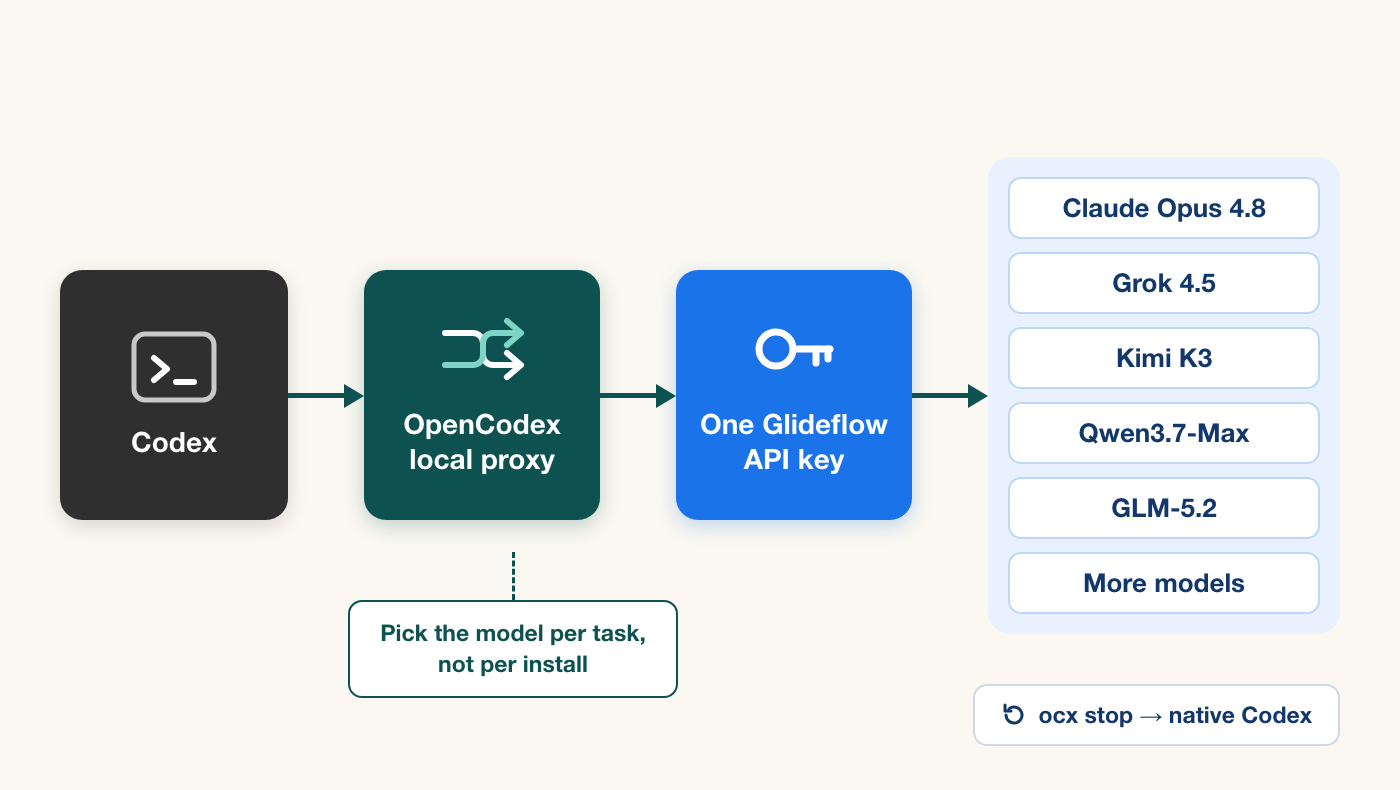
The setup below lets you choose the model per task, inside Codex, without changing your key or your workflow. You run OpenCodex locally and add Glideflow as a custom OpenAI-compatible provider. OpenCodex receives Codex’s Responses API traffic on your machine, translates it to Chat Completions, and sends it to the route you selected. Switching models becomes one flag or one dropdown, so the choice costs you seconds instead of a reinstall.
One key then reaches Claude Opus 4.8, Claude Sonnet 5, Grok 4.5, Kimi K3, Kimi K2.7 Code, Qwen3.7-Max, and GLM-5.2, among others. kimi-k3 is used as the first example below only because it is a convenient starting point, not because it is the answer for every task.
This is a BYOK setup: you use an API key from your own Glideflow account and pay for the requests made with that key. OpenCodex, Codex, and Glideflow are independent products. Treat the proxy as a local developer tool, keep normal code review in place, and follow the terms and policies that apply to each product.
One thing to read before you install rather than after: uninstalling is not a single clean command, and two kinds of leftovers can make a working Codex look broken. They are both fixable, and they are documented in Return Codex to its original state below.
What OpenCodex changes—and what it does not
Codex normally speaks the OpenAI Responses API. Glideflow exposes an OpenAI-compatible API, including Chat Completions and model listing endpoints. OpenCodex is the bridge between those two shapes: its openai-chat adapter sends requests to {baseUrl}/chat/completions and translates streaming text, tool calls, and usage back into the format Codex expects. See the project’s adapter reference for the precise translation boundary.
That makes OpenCodex useful when a coding workflow needs model choice rather than a single fixed default. It does not mean that every route has identical context behavior, tool reliability, reasoning controls, latency, or output quality. Use the same task, branch, tests, and budget for each comparison; then keep the routes that work on your repository.
The useful mental model is:
Codex CLI or App → OpenCodex on your computer → Glideflow API → selected modelYour Glideflow key stays on your computer in the OpenCodex configuration or, preferably, in an environment variable. It is not an access token for ChatGPT or a way to bypass account quotas, subscriptions, or authentication requirements.
Before you start
You need:
- Node.js 18 or newer. OpenCodex bundles its Bun runtime during installation; you do not need a separate Bun installation. OpenCodex installation notes
- A working Codex CLI or Codex app installation.
- A Glideflow account and an API key from the dashboard.
- A small, non-sensitive repository or a clean branch for the first run.
Create a separate Glideflow key for this experiment if your account supports multiple keys. It makes revocation and spend review simpler. Do not put a live key in a repository, config.json shared with a team, a screenshot, or a support post.
For the examples below, export the key in the shell that will start OpenCodex:
export GLIDEFLOW_API_KEY="sk-your-key"The shell will retain the value only for that session. Use your operating system’s secret store or approved environment-management approach if you need a persistent setup.
Install OpenCodex, then preserve the native Codex route
Install the current package with a user-owned Node installation. Avoid sudo unless your Node setup explicitly requires it:
npm install -g @bitkyc08/opencodexThen check that the command actually landed before you go further:
which ocxThis step is not a formality. The package registers two binaries, ocx and opencodex, and on one of our machines neither symlink was created even though the install reported success — every later command in this guide would have failed with command not found. If which ocx returns nothing:
- Confirm your npm global bin directory is on
PATH(npm prefix -g, then check that<prefix>/binis in$PATH). - Reinstall and read the output rather than scrolling past it. The package’s postinstall step fetches a Bun runtime, and a failure there can leave a partial install.
- If your npm setup blocks install scripts, that postinstall step is what is being blocked. Re-run the install with scripts permitted for this package, using whatever mechanism your package manager provides. Do not paste a flag from another package manager;
npmandpnpmdo not share the same option names here.
Do not work around a broken install by editing Codex configuration files by hand. Everything below assumes ocx runs.
For a multi-model Codex setup, start OpenCodex before adding Glideflow. This keeps OpenCodex’s built-in OpenAI forwarding provider in place, so your normal Codex model choices remain available alongside the Glideflow routes:
ocx startOn a first run, OpenCodex creates its local state in ~/.opencodex, starts a loopback proxy (normally on port 10100), and points Codex at that local proxy. It also retains a fallback copy of the native Codex configuration.
One point deserves precision, because it is easy to overstate. OpenCodex does not add a second provider beside Codex’s own; it repoints Codex’s built-in OpenAI provider at the local proxy, and the proxy then routes by model ID — bare IDs forward to the Codex backend, glideflow/<model-id> goes to Glideflow. In a local verification, the native OpenAI models stayed listed in the picker after Glideflow was added, and the new routes appeared separately. We did not run a full native task through the proxy, so treat native forwarding as something to verify on your own machine with one small task before you rely on it.
The consequence of that design is worth stating plainly: while OpenCodex is installed, every request goes through the local proxy, native ones included. There is no automatic fallback to the official endpoint if the proxy stops. That is the trade for getting one picker with every model in it.
OpenCodex’s guided ocx init flow is useful for a single-provider setup, but it creates a new provider configuration. For this particular goal—keep native Codex choices and add a second provider—the dashboard or a careful merge is the safer path. Its configuration reference documents every field.
The normal local binding is 127.0.0.1, which is the right choice for a personal development machine. Do not change it to a LAN or public bind merely to make the setup more convenient. A network-exposed proxy can expose access to every provider credential it holds. If you ever have a genuine remote-use case, first read OpenCodex’s remote-access authentication requirements.
Add one Glideflow provider, then choose from multiple models
The easiest way to add Glideflow without disturbing the native route is the local dashboard:
ocx guiChoose Add Provider, select the custom OpenAI-compatible option, then set the provider name to glideflow, the base URL to https://api.glideflowai.com/v1, and a Glideflow API key. Leave the existing OpenAI provider and its default selection unchanged. Then choose a small set of models for the Codex-visible allowlist.
You can also merge a named provider such as glideflow into ~/.opencodex/config.json. One provider holds your endpoint and key; the selectedModels list determines the model routes you can switch between in Codex. The important detail is that the existing openai provider stays in the file. This example starts with a short evaluation set, which keeps the picker readable and avoids treating a large catalog as a promise that every model suits every task.
{ "port": 10100, "providers": { "openai": { "adapter": "openai-responses", "baseUrl": "https://chatgpt.com/backend-api/codex", "authMode": "forward", "codexAccountMode": "pool" }, "glideflow": { "adapter": "openai-chat", "baseUrl": "https://api.glideflowai.com/v1", "apiKey": "${GLIDEFLOW_API_KEY}", "defaultModel": "kimi-k3", "selectedModels": [ "claude-opus-4-8", "claude-sonnet-5", "grok-4.5", "kimi-k3", "kimi-k2.7-code", "qwen3.7-max", "glm-5.2" ] } }, "defaultProvider": "openai"}Four details are important here:
- The base URL includes
/v1. This is an OpenAI-compatible Chat Completions integration, not the Anthropic-compatible configuration used by a direct Claude Code setup. apiKeyreferences an environment variable. Do not replace it with a literal production key in a dotfile that may be copied or backed up.- Keeping
openaianddefaultProvider: "openai"preserves the native Codex path. Glideflow still appears as separately selectableglideflow/<model-id>routes;defaultModelselects a starting Glideflow route only when that provider is chosen. selectedModelsis an allowlist for the Codex picker, not a permanent statement about Glideflow’s catalog. Omit it if you intentionally want OpenCodex to discover and display all models available to your key.
OpenCodex fetches a provider’s /models catalog by default. If you use an allowlist, update it whenever you intentionally add another model to your evaluation. The provider guide explains the difference between live discovery, models, and selectedModels. Read the provider configuration guide
Start the local proxy, then refresh its model catalog and Codex integration:
ocx startocx syncIf OpenCodex reports that the chosen port is busy, let it select a free loopback port or resolve the existing local process before proceeding. Do not solve a local port conflict by exposing the proxy to the network.
What this setup was verified to do
The configuration path above was tested with one Glideflow provider and a six-model allowlist. Every allowlisted model appeared in the proxy’s catalog as glideflow/<model-id>, and a short non-streaming request through the proxy completed successfully with Kimi K3 before any repository task was attempted.
Being precise about scope: that verification covered the routing mechanism and one model end to end. The other routes in the allowlist above were not individually driven through the proxy in that session. Run the small connectivity check below against each route you plan to depend on, rather than assuming that one working route certifies the rest.
This check matters because it separates three different problems: whether the Glideflow key and model work, whether OpenCodex can translate the request, and whether the Codex model picker has been refreshed. Do the small connectivity check first; do not debug all three layers at once.
Return Codex to its original state
When you no longer need OpenCodex, stop it:
ocx stopThis stops the local proxy and restores the connection settings it injected into ~/.codex/config.toml. In a local verification, that part worked: the injected loopback base URL was removed, and running ocx restore afterward was harmless and reported that no OpenCodex configuration remained.
Two things it does not clean up. Both are easy to fix once you know they exist, and confusing if you do not, so read this before you install rather than after.
1. The model cache
To make its routes appear in Codex’s native picker, OpenCodex overwrites ~/.codex/models_cache.json with its own catalog. Removing the proxy does not restore the original file. The leftover glideflow/* entries are missing a field that Codex’s parser requires, and Codex rejects the entire cache rather than skipping the bad entries:
ERROR codex_models_manager::cache: failed to load models cache:missing field `supports_reasoning_summaries` at line 88 column 5The visible symptom is an empty or stale model list, which looks like a broken Codex install rather than uninstall residue. The fix:
rm ~/.codex/models_cache.jsonThen run Codex once so it refetches the catalog from the official endpoint, and restart the Codex desktop app if you use it — a running app keeps the old list in memory and will not pick up the repaired file on its own.
2. Conversations that ran through the proxy
This one is easier to miss. A model served over the Chat Completions adapter has no native reasoning item to return, so the proxy synthesises one. Those synthesised items carry plaintext in a content array, and the official Responses API requires that array to be empty. While the proxy is running it absorbs the difference. Once it is gone, Codex replays the full thread to the official endpoint, and every turn is rejected:
Invalid 'input[109].content': array too long.Expected an array with maximum length 0, but got an array with length 1 instead.The thread is stuck permanently — retrying cannot help, because the bad item is in the stored history. Threads created before you installed the proxy are unaffected.
You can tell a synthesised item from a genuine one: real reasoning items carry a long encrypted_content payload and a provider-issued id, while the synthesised ones have encrypted_content: null, an empty summary, and a short generated id. Session transcripts live in ~/.codex/sessions/<year>/<month>/<day>/rollout-*.jsonl, one JSON object per line. Removing the affected records from the transcripts of those threads restores them; back the files up first.
If none of that appeals, the low-effort alternative is simply to start a fresh thread. The practical rule: while OpenCodex is installed, use it in throwaway threads, and keep conversations you want to keep on native Codex.
Switch models in Codex without changing anything else
With the provider above, OpenCodex addresses a route as provider/model. Start a small Codex CLI task with Kimi K3:
codex -m "glideflow/kimi-k3" \ "Inspect this repository. List the test command you would run, but do not edit files."In the Codex app, the routes in selectedModels should appear in the model picker after a successful sync. Select glideflow/kimi-k3, choose a small task, and confirm that the session identifies the model if your client version exposes that information.
Do not make a production repository your first test. A good sequence is:
- Ask the model to inspect the repository and name the relevant test command without editing.
- Ask it to explain one small, known failing test.
- On a clean branch, request the smallest fix and the single relevant test command.
- Review the diff and test output yourself.
Once the first route is working, replace only the model part of the command. This is the point of the integration: the endpoint and key stay the same while Codex runs a different model.
codex -m "glideflow/claude-opus-4-8" "Explain the failing test, then propose the smallest fix."codex -m "glideflow/claude-sonnet-5" "Explain the failing test, then propose the smallest fix."codex -m "glideflow/grok-4.5" "Explain the failing test, then propose the smallest fix."codex -m "glideflow/kimi-k2.7-code" "Explain the failing test, then propose the smallest fix."codex -m "glideflow/qwen3.7-max" "Explain the failing test, then propose the smallest fix."codex -m "glideflow/glm-5.2" "Explain the failing test, then propose the smallest fix."Changing one variable at a time is much more useful than changing the model, prompt, branch, and permissions together. It lets you learn whether a difference comes from the selected route or from the experiment itself.
Building a per-task routing habit
This is the part that outlasts any particular model. Once switching is cheap, the useful question stops being “which model is best” and becomes “which model is worth its price for this task.” Those are different questions, and only the second one has a stable answer.
A rough shape that many teams converge on:
- Expensive, careful models for expensive, careful work. A subtle bug in unfamiliar code, an architectural decision, a refactor that touches many files. Here a wrong answer costs you an hour of review, so paying more per token is the cheap option.
- Mid-tier models for the bulk of the day. Bounded edits with a named test, small features, mechanical refactors. Most agent work is this, and it is where routing well actually saves money.
- Fast, cheap models for volume and throwaway work. Renames, docstrings, test scaffolding, “what does this file do.” Latency matters more than depth.
- Long-context models when the input is the problem. A large repository sweep or a document-heavy task, where the constraint is how much the model can hold rather than how well it reasons.
The exact available menu changes. Copy IDs from Glideflow’s model catalog or from the models OpenCodex discovers for your key. The routes below are hypotheses to test on your repository, not universal rankings — and the point of the table is the left column’s shape, not the specific names.
| Route | Task class it is a candidate for | What to record |
|---|---|---|
claude-opus-4-8 |
Subtle bug in unfamiliar code, architectural decisions | Whether the diff needed rework, and review time saved |
claude-sonnet-5 |
Everyday bounded edits with a focused test | Instruction following and diff scope |
grok-4.5 |
Multi-step investigation and tool-heavy loops | Tool-call correctness and retries |
kimi-k3 |
One bounded bug investigation or a small feature plan | Test result, tool turns, manual cleanup |
kimi-k2.7-code |
Repository-level edit with a focused test | Instruction following and diff scope |
qwen3.7-max |
Planning and task decomposition | Plan quality and review burden |
glm-5.2 |
Larger repository or document-heavy task | Long-context behavior and output budget |
Keep a minimal evaluation note for every run: commit SHA, model ID, exact prompt, tool permissions, input and output tokens, wall-clock time, test result, and manual changes required. An agent task can be output-heavy, so token costs should be compared as separate input and output numbers rather than a single blended figure.
Prices and availability change, especially for newly added models. For current USD token rates, use the live model catalog and your dashboard before setting a budget. Do not rely on a copied price table from an old blog post or terminal history.
Verify the API before debugging Codex
If the model picker is empty or a Codex session fails immediately, check the API path before changing several proxy settings. This direct request tests the same key and model against Glideflow’s OpenAI-compatible endpoint:
curl https://api.glideflowai.com/v1/chat/completions \ -H "Authorization: Bearer $GLIDEFLOW_API_KEY" \ -H "Content-Type: application/json" \ -d '{ "model": "kimi-k3", "messages": [{"role": "user", "content": "Reply with OK."}], "max_tokens": 512 }'Do not paste the expanded command output into a public issue if it could reveal an authorization header, request content, repository details, or key. If the direct request works but Codex does not, inspect the OpenCodex provider name, /v1 base URL, selected model ID, and the environment inherited by the ocx start process.
The same direct check can be made with the official OpenAI SDKs. Python:
import osfrom openai import OpenAI
client = OpenAI(    api_key=os.environ["GLIDEFLOW_API_KEY"],    base_url="https://api.glideflowai.com/v1",)
response = client.chat.completions.create(    model="kimi-k3",    messages=[{"role": "user", "content": "Reply with OK."}],    max_tokens=512,)
print(response.choices[0].message.content)
And Node.js:
import OpenAI from "openai";
const client = new OpenAI({  apiKey: process.env.GLIDEFLOW_API_KEY,  baseURL: "https://api.glideflowai.com/v1",});
const response = await client.chat.completions.create({  model: "kimi-k3",  messages: [{ role: "user", content: "Reply with OK." }],  max_tokens: 512,});
console.log(response.choices[0].message.content);
These checks validate credentials, endpoint, and one model ID. To test another route, change only the model value—for example, from kimi-k3 to kimi-k2.7-code—and repeat the same check. They do not prove that a model will complete a long agent loop reliably. The real test remains a bounded repository task with a reviewed diff and a passing test.
Troubleshooting the common failure modes
401 or an invalid-key response
Confirm that GLIDEFLOW_API_KEY is exported in the same environment that starts ocx. Do not use echo $GLIDEFLOW_API_KEY in shared terminal recordings or logs. Instead, re-export the key from your secret source, restart the proxy, and retry the small direct request.
The model is missing from the picker
Run ocx sync, then inspect the exact model ID in the Glideflow catalog. If you configured selectedModels, ensure it includes the exact, case- and punctuation-sensitive ID. Remove a stale allowlist entry rather than guessing a display name.
A route returns an availability error
An availability error can mean the ID is wrong, the model is not enabled for the key’s group, or routing is temporarily unavailable. First verify the ID with /v1/models or the catalog, then retry a small request later. Do not silently substitute a different model and record the experiment as if it used the original route.
The response has little or no visible text
Use a reasonable output budget for the first request. Reasoning-oriented models may consume a very small allowance before producing visible text. Start at 512 output tokens for a connectivity check, then size the limit according to the actual task.
A tool loop behaves differently from native Codex
OpenCodex translates protocols; it cannot make every upstream model behave like a native Codex model. Reduce the task to one tool call, capture the sanitized proxy log, and compare it with the same task on another route. Keep normal approval, sandbox, branch, review, and test controls in place.
OpenCodex currently documents a specific multi-agent limitation: on the V2 surface, a native parent that spawns a routed child can lose the child task body because it arrives encrypted. For reliable cross-provider sub-agent experiments, use the V1 surface or avoid that topology until the limitation changes. OpenCodex issue #92
Keep the setup safe and inexpensive
The proxy is a local convenience layer, not a reason to relax engineering controls. A solid default is:
- Use one limited-scope Glideflow key for OpenCodex, separate from application production keys.
- Keep the proxy on loopback only.
- Start with a disposable branch and explicit file scope.
- Ask the agent to inspect and plan before allowing edits.
- Run one named test, review the patch, and only then expand the task.
- Record the model ID and date beside any benchmark result, since model menus and behavior evolve.
Never expose the local OpenCodex dashboard or proxy port to the public internet. Never add a provider key to a shared prompt, a repository instruction file, or a browser-side application. If a key is accidentally exposed, revoke it in the Glideflow dashboard and create a replacement before investigating anything else.
Where to go next
After you have one repeatable run, trim the picker to the three or four routes your own tests support. A short list you understand beats a long one you are guessing at.
The habit worth keeping is smaller than it sounds: before starting a task, spend one second deciding what kind of task it is, and pick accordingly. A bounded edit on a fast route. A repository investigation on a long-context route. A decision you will have to live with on the strongest route you are willing to pay for. Over a week that is a few hundred small choices, and it is where the savings and the quality both come from — not from finding one model that wins everywhere, because that model does not exist for long.
Model rankings will keep churning. A workflow where swapping the model is one flag does not.
For more connection patterns, see the Glideflow quickstart and OpenAI-compatible API examples. To explore exact available IDs and current prices, visit the model catalog. For the local proxy, installation details, and latest compatibility notes, visit the OpenCodex GitHub repository.
If you work in Claude Code rather than Codex, the equivalent setup needs no proxy at all: point Claude Code at any model with one base URL. To decide which routes deserve a place in your picker, read GLM-5.2 vs Kimi K2.7 vs Qwen3.7 for coding agents, and for the cost side, choosing an OpenAI-compatible gateway for coding agents.